
What are 3D texture types?
The short answer
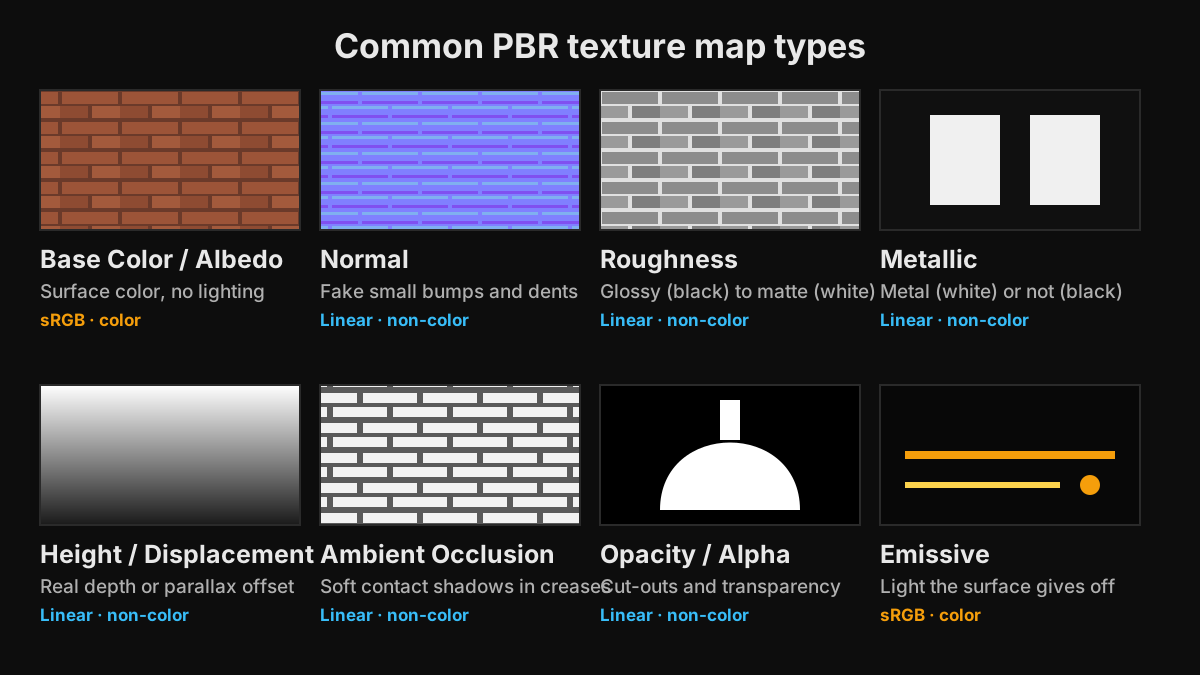
A 3D material is usually built from several texture maps, each controlling one property of the surface. The core physically based rendering (PBR) set is base color, normal, roughness, and metallic, often with ambient occlusion and height. Opacity and emissive maps are added when a surface needs transparency or glows. All maps share the same UV layout, so pixel for pixel they describe the same point on the model. Most props need four or five of them, not all eight.
The core PBR maps
Base color (albedo)
The color of the surface with no lighting, shadows, or highlights painted in. For metals it holds the color of the reflection. This is the map most people mean when they say texture. It is stored in sRGB.
Normal
Stores a surface direction per pixel in RGB, so small bumps, seams, scratches, and rivets react to light without extra geometry. Flat areas are light blue-purple (128, 128, 255). There are two conventions: OpenGL (Blender, Unity, Godot, glTF) and DirectX (Unreal Engine), which differ only in the green channel.
Roughness
Grayscale control over how sharp reflections are. Black is smooth and glossy, white is rough and matte. Variations in roughness, such as worn edges, smudges, and dust, do more for realism than almost any other map. Glossiness and smoothness maps are the same information inverted.
Metallic
Marks which parts are bare metal. It is mostly pure black (non-metal) or pure white (metal), with in-between values only at transitions such as rust, dirt, or paint over steel. It also changes how the renderer reads the base color: on metal pixels, base color becomes reflection color and there is no diffuse color.
Ambient occlusion (AO)
A grayscale map of where ambient light is blocked, such as crevices, corners, and contact points. Engines also compute screen-space ambient occlusion, but a texture AO map adds small-scale detail that real-time effects miss. Path tracers such as Blender Cycles calculate occlusion on their own, so AO maps matter most for real-time use and glTF, which has a dedicated occlusion slot.
Height and displacement
A grayscale map of distance above or below the surface. Engines use it for parallax occlusion mapping, which fakes depth on bricks or cobblestones; offline renderers such as Cycles use it for true displacement on subdivided geometry; and tools use it as a source for generating normal maps. Height benefits from 16-bit precision, because 8-bit maps can show stepped terraces when displaced.
Supporting maps
Opacity (alpha)
Controls transparency. Alpha clip or cutout is used for leaves, fences, chains, and hair cards, where pixels are either visible or not. Alpha blend is used for glass and smoke, where pixels are partly see-through. Opacity is often stored in the alpha channel of the base color texture.
Emissive
Makes parts of the surface glow: screens, LEDs, lava, sci-fi panels. It is a color map in sRGB. In real-time engines an emissive surface looks bright but does not light its surroundings unless global illumination or baked lighting is used.
Specular and glossiness
The maps of the older specular-glossiness workflow. A specular map sets reflection color and strength, and glossiness is inverted roughness. Most modern engines and glTF default to metallic-roughness, but you will still meet spec-gloss maps in older libraries and some film pipelines.
Packed maps
To save memory and texture samples, engines pack grayscale maps into the channels of one image. Unreal projects often use ORM: ambient occlusion in red, roughness in green, metallic in blue. glTF puts roughness in green and metallic in blue. Unity HDRP's Mask Map stores metallic in red, ambient occlusion in green, a detail mask in blue, and smoothness in alpha.
Specialized maps
Subsurface scattering for skin and wax, sheen for cloth, clearcoat for car paint, and anisotropy for brushed metal and hair. Only specific materials need these.
Color space: the most common import mistake
Base color and emissive describe colors and are stored in sRGB. Every other map stores numbers, not colors, and must be read as linear. In Blender, set those image nodes to Non-Color. In Unity, untick sRGB (Color Texture) in the import settings. In Unreal Engine, untick sRGB on the texture asset. A roughness map read as sRGB makes the whole surface shinier than intended, and a normal map read as sRGB makes lighting look bent.
Which maps do you actually need?
- Static props and furniture: base color, normal, roughness, and often ambient occlusion. Add metallic only if there are bare metal parts.
- Weapons and vehicles: the full set including metallic, plus emissive for lights, screens, or sights.
- Foliage, fences, and chains: base color with alpha for opacity, plus normal and roughness.
- Stylized hand-painted games: often only base color with lighting painted in, sometimes with a simple normal map.
- Archviz floors and walls: tiling base color, normal, roughness, and height for displacement close to the camera.
- 3D printing: none. STL stores geometry only; color printing uses vertex colors or formats such as 3MF.
Texture naming conventions
Texture sets are easier to manage, and faster to import, when file names end with a consistent suffix: _BaseColor or _Albedo, _Normal or _N, _Roughness or _R, _Metallic or _M, _AO, _Height or _H, _Opacity, and _Emissive or _E. Several tools rely on these suffixes. Blender's Node Wrangler add-on can build a full Principled BSDF setup from a folder of maps with Ctrl+Shift+T by reading the names, and many engine import pipelines use suffixes to pick compression and color space automatically. Keep the suffixes and the UV layout identical across every map in a set.
Which maps TextureFast generates
TextureFast starts by generating a Base Color from your prompt and your model's UV layout, at up to 4K depending on your plan. The PBR Material tab then extracts Albedo, Normal, Height, Roughness, and Ambient Occlusion from that Base Color at 1K or 2K. You can generate the maps one at a time or, on Pro and higher plans, all at once with one-click full material generation. Metallic extraction is marked coming soon, so set metallic values in your engine for now. Opacity and emissive maps are not generated; author them separately if the asset needs them. All maps download as PNG.
Ready to try it?
Open the matching TextureFast workflow
Continue from this answer into the public workflow page, then start generation or compare plans when you are ready.