
What is texture in a 3D model?
The short answer
A texture is an image that gives a 3D surface its detail. The mesh, made of vertices, edges, and faces, only describes shape. A wooden crate can be a simple cube of twelve triangles; the planks, nails, scratches, and dirt all come from texture images. The model's UV coordinates tell the renderer which pixel of each image belongs to each point on the surface, and the material decides what each image means: color, bumpiness, shininess, and so on. Swap the textures and the same mesh can become oak, rusted steel, or a stylized cartoon prop.
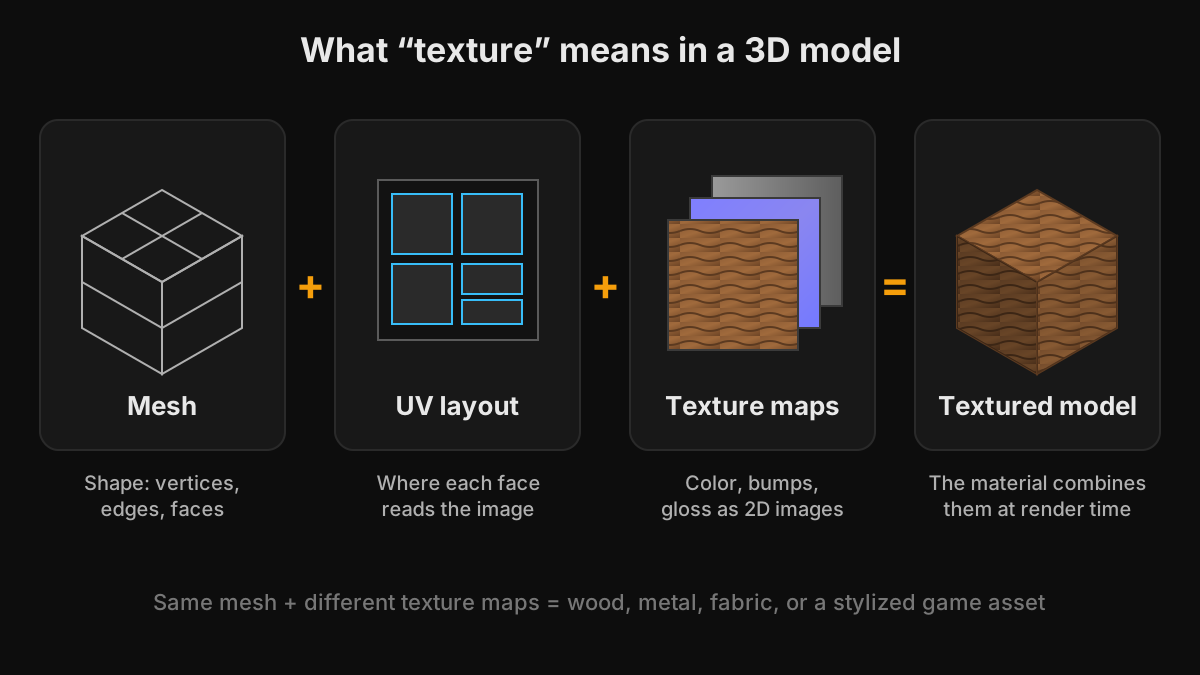
Mesh, material, shader, and texture
These four words are often mixed up, but each has a specific job.
Mesh
The geometry: vertices connected into edges and faces. It defines the silhouette and large forms. It also stores per-vertex data such as normals and UV coordinates.
Material
A set of inputs that describes how the surface reacts to light. Examples are the Principled BSDF in Blender, the Lit material in Unity URP, a material graph in Unreal Engine, and the metallic-roughness material in glTF. Every input can be a constant value, such as red with roughness 0.4, or a texture.
Shader
The program that runs on the GPU and turns the material's inputs into pixel colors. In everyday conversation, shader and material are often used interchangeably.
Texture
An image plugged into one of the material's inputs. Textures become necessary when a value has to change across the surface: color that varies from plank to plank, scratches that are glossier than the paint around them, or bumps that catch the light. A plain plastic ball does not need a texture at all; a worn leather sofa does.
How a texture gets onto the model
Every vertex stores a UV coordinate that points to a position in the image. When a triangle is drawn, the GPU blends the UV coordinates of its corners and samples the texture at each pixel on screen. The individual pixels of a texture are called texels. For objects far from the camera, the GPU reads smaller pre-filtered copies of the texture called mipmaps, which prevents shimmering. Creating the UV coordinates is called UV unwrapping, and it has a bigger effect on final quality than most beginners expect.
One model, several texture maps
Modern real-time and offline renderers use physically based rendering (PBR), where a material is described by a set of maps that share the same UV layout: base color for the surface color, normal for fine bumps, roughness for gloss, metallic for which parts are bare metal, ambient occlusion for contact shadows, and height for depth. Base color is a color image stored in sRGB. The other maps are data, and must be imported as linear or non-color. Getting that setting wrong is one of the most common reasons a textured model looks washed out or oddly shiny.
Tiling textures vs unique textures
A tiling texture is a seamless pattern that repeats, such as a brick wall, floor tiles, grass, or concrete. Its UVs can extend far beyond the 0 to 1 square so the pattern repeats many times. Tiling textures are cheap in memory and ideal for environments and architectural visualization. A unique texture is laid out once over the whole model, so every pixel belongs to exactly one spot. Props, characters, weapons, and vehicles usually use unique textures because wear, decals, and color changes need to happen in specific places. Trim sheets combine the two ideas by packing reusable strips of detail into one texture that many models share. TextureFast creates unique textures painted into your model's own UV layout.
Texture resolution and memory
Textures are usually square and sized in powers of two: 512, 1024 (1K), 2048 (2K), or 4096 (4K) pixels per side. Modern graphics APIs accept other sizes, but powers of two still work best with mipmaps and GPU compression. Resolution has a real cost: an uncompressed 4K RGBA texture takes 64 MB of video memory, plus about a third more for mipmaps. GPU compression formats such as BC7 on desktop and ASTC on mobile reduce that several times over. A practical approach is 2K to 4K for hero assets seen up close and 512 to 1K for small props, while keeping texel density consistent across objects that appear side by side.
Texture file formats
- PNG: lossless, supports transparency, and the safest format for exchanging texture maps. TextureFast exports PNG.
- JPG: smaller lossy files. Fine for color previews, but compression artifacts in normal maps show up as false bumps.
- TGA: an older lossless format that is still common in game pipelines.
- EXR and 16-bit PNG or TIFF: higher bit depth for height and displacement, where 8-bit steps can cause visible banding.
- KTX2 with Basis Universal: GPU-compressed textures for the web and glTF delivery.
Where textures live in common 3D files
A GLB file packs geometry, materials, and textures into a single binary file, which makes it the easiest format to share. A GLTF file stores the scene as JSON and either references separate image files or embeds them. OBJ stores geometry and UVs only; materials live in a separate .mtl file that points to image files by path, so an OBJ that looks grey after download is usually missing its .mtl or images. FBX can embed textures or reference them externally, and those references often break when files move between computers. STL stores geometry only, with no UVs or textures, and PLY usually carries per-vertex colors rather than image textures.
You can check what a file actually contains, including meshes, materials, and UV channels, with the free 3D inspector before texturing or converting it.
How to add textures to a model
- Paint them in Substance 3D Painter, Blender Texture Paint, 3DCoat, or over an exported UV layout in Photoshop or Krita.
- Build them procedurally with node tools such as Substance 3D Designer or Blender shader nodes.
- Download tiling materials from scanned and CC0 libraries such as Poly Haven, ambientCG, or Megascans on Fab.
- Generate them with AI. In TextureFast you upload a UV-unwrapped GLB, GLTF, OBJ, or FBX model, describe the surface, generate a Base Color, and then extract PBR maps. The mesh stays in your browser.
- Import the maps into Blender, Unity, Unreal Engine, or Godot and connect each one to the matching material input.
Ready to try it?
Open the matching TextureFast workflow
Continue from this answer into the public workflow page, then start generation or compare plans when you are ready.